
Subnet Calculator
Type an IP address and prefix such as 192.168.10.77/26, or an address and a dotted subnet mask, and the calculator shows the network and broadcast addresses, first and last usable hosts, number of hosts, wildcard mask, address type and a binary breakdown. It also converts between CIDR and dotted masks and splits any network into equal smaller subnets.
- Free to use
- No sign-up
- Runs in your browser
IPv4 subnet calculator
Subnetting Reference Pack
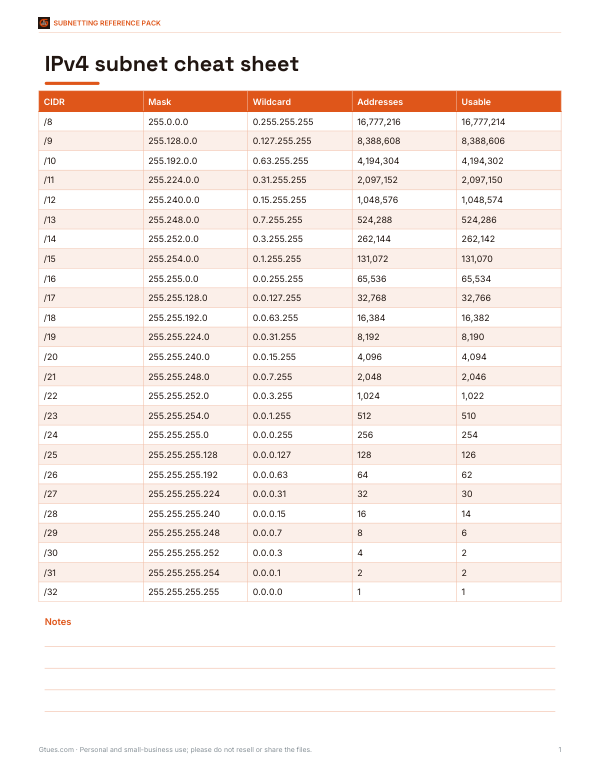
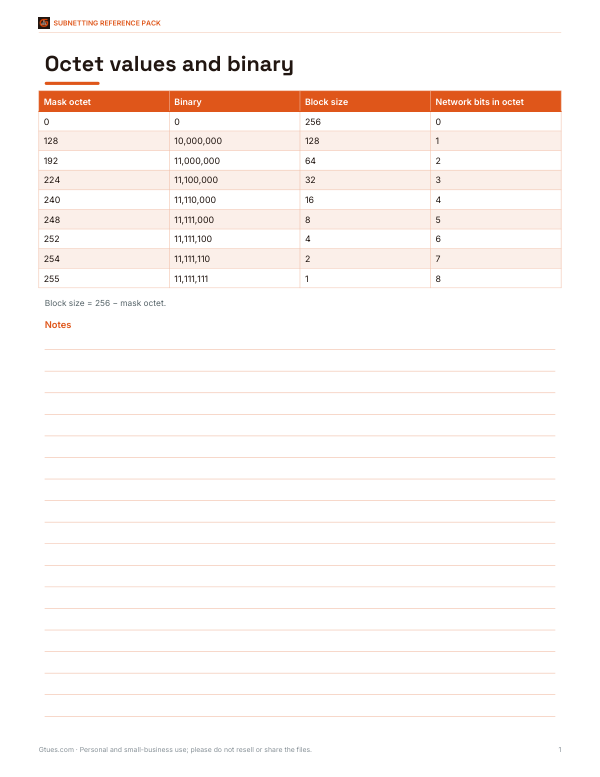
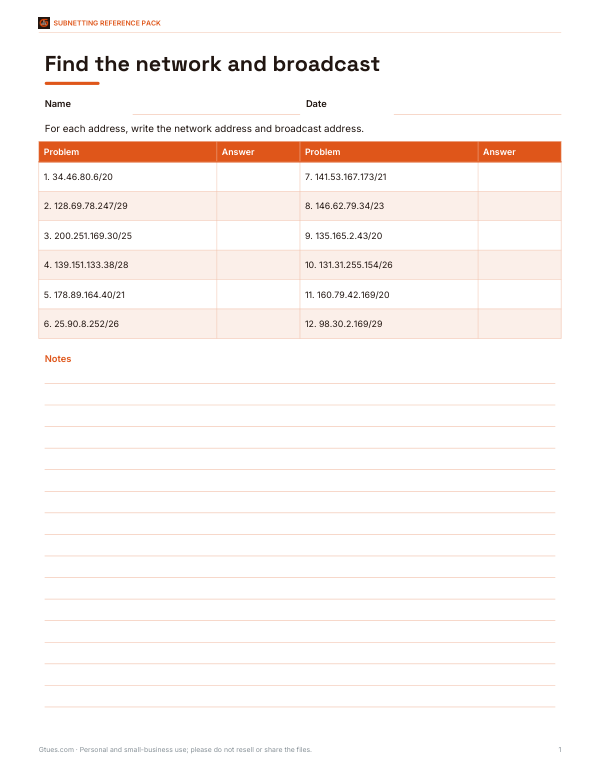
Printable subnetting cheat sheet (CIDR, masks, wildcards, hosts), a binary and powers-of-two table, subnetting practice worksheets with answers and an IP address plan workbook.
- Cheat sheet (PDF/XLSX)
- Binary table (PDF)
- Practice 1 (PDF, DOCX)
- Practice 2 (PDF, DOCX)
- IP plan (XLSX)
Formats: PDF, XLSX, DOCX. Instant download after payment (link valid 72 hours, up to 5 downloads). AI-assisted: the templates were drafted with AI help and reviewed and laid out before publishing.
$3.00 USD, one-time 5 files · about $0.60 each
- Instant download
- 7-day refund
- Secure checkout by Stripe
7-day money-back guarantee. Full refund within 7 days of purchase, even after you download.
Free sample: Binary Octet Table (PDF, 53 KB)
Full refund within 7 days — see the refund policy and license.
Free printables
Single sheets you can print right now, no sign-up. The full pack adds every sheet in one download plus the editable files.
 Printable Subnet Hosts Practice Sheet
 Printable IP Address Plan
How subnetting works
An IPv4 address is 32 bits, usually written as four numbers from 0 to 255. The prefix length (the number after the slash) says how many of those bits identify the network; the rest identify hosts within it. A /24 network keeps 24 network bits and leaves 8 host bits, giving 256 addresses. The first address is the network address and the last is the broadcast address, so 254 are usable for devices. Every extra prefix bit halves the size of the network.
CIDR to subnet mask chart
| CIDR | Subnet mask | Wildcard | Addresses | Usable hosts |
|---|---|---|---|---|
| /16 | 255.255.0.0 | 0.0.255.255 | 65,536 | 65,534 |
| /20 | 255.255.240.0 | 0.0.15.255 | 4,096 | 4,094 |
| /22 | 255.255.252.0 | 0.0.3.255 | 1,024 | 1,022 |
| /23 | 255.255.254.0 | 0.0.1.255 | 512 | 510 |
| /24 | 255.255.255.0 | 0.0.0.255 | 256 | 254 |
| /25 | 255.255.255.128 | 0.0.0.127 | 128 | 126 |
| /26 | 255.255.255.192 | 0.0.0.63 | 64 | 62 |
| /27 | 255.255.255.224 | 0.0.0.31 | 32 | 30 |
| /28 | 255.255.255.240 | 0.0.0.15 | 16 | 14 |
| /29 | 255.255.255.248 | 0.0.0.7 | 8 | 6 |
| /30 | 255.255.255.252 | 0.0.0.3 | 4 | 2 |
| /31 | 255.255.255.254 | 0.0.0.1 | 2 | 2* |
| /32 | 255.255.255.255 | 0.0.0.0 | 1 | 1 |
*A /31 has no network or broadcast address when used on point-to-point links (RFC 3021), so both addresses are usable.
How to use the calculator
- Enter an address with a prefix, such as 10.20.30.40/22, or an address in the first box and a dotted mask such as 255.255.252.0 in the second.
- Read the network, broadcast and usable host range.
- Check the binary view to see exactly where the network bits end.
- To plan smaller networks, choose a longer prefix in “Split into subnets” — for example split a /24 into four /26 subnets.
- Download the subnet list as a CSV for your documentation.
Worked example
For 192.168.10.77/26 the mask is 255.255.255.192, so the last octet is split into blocks of 64. 77 falls in the block starting at 64, giving network 192.168.10.64 and broadcast 192.168.10.127. Usable hosts run from .65 to .126 — 62 addresses. The wildcard mask, used in access control lists and some routing configurations, is 0.0.0.63. Splitting the /26 into /28s gives four subnets of 14 hosts each: .64, .80, .96 and .112.
The block-size shortcut
To subnet in your head, find the “interesting” octet (the one where the mask is not 255 or 0) and subtract its mask value from 256. That is the block size. Networks start at multiples of the block size; the broadcast is one less than the next network. For a mask of 255.255.255.224 the block is 32, so networks begin at .0, .32, .64, .96 and so on.
Private and special address ranges
| Range | Use |
|---|---|
| 10.0.0.0/8 | Private networks |
| 172.16.0.0/12 | Private networks |
| 192.168.0.0/16 | Private networks (most home routers) |
| 100.64.0.0/10 | Carrier-grade NAT |
| 127.0.0.0/8 | Loopback (localhost) |
| 169.254.0.0/16 | Link-local (no DHCP address received) |
| 224.0.0.0/4 | Multicast |
Planning subnets
- Size each subnet for future growth — roughly double today’s device count.
- Use /30 or /31 for router-to-router links.
- Keep related subnets contiguous so they can be summarised in routing tables.
- Document every subnet, VLAN and gateway address.
- Reserve the first or last usable address for the gateway consistently.
- Avoid overlapping ranges with VPN partners and cloud networks.
Troubleshooting with subnets
Many network problems come down to subnetting mistakes: two devices that should talk can’t because one has the wrong mask, a gateway outside the host range, or an address that is actually the network or broadcast address. Enter each device’s address and mask here and check that they share the same network address and that the gateway falls inside the usable range.
What about IPv6?
IPv6 uses 128-bit addresses, and a standard LAN subnet is a /64 — far larger than any IPv4 network — so host counting is rarely a concern. This calculator focuses on IPv4, where careful subnetting still matters because addresses are scarce.
Privacy
All calculations run in your browser. Addresses you enter are not sent anywhere.
Frequently asked questions
How many hosts are in a /24?
254 usable hosts out of 256 addresses.
What is the subnet mask for /26?
255.255.255.192, with 62 usable hosts.
What is a wildcard mask?
The inverse of the subnet mask, used in ACLs and some routing configurations; for /24 it is 0.0.0.255.
How do I convert a subnet mask to CIDR?
Count the one bits in the mask: 255.255.255.0 has 24, so it is /24.
Why are two addresses not usable?
The first is the network address and the last is the broadcast address (except in /31 and /32).
Can I split a network into smaller subnets?
Yes, choose a longer prefix in the split option.
What is the difference between /24 and 255.255.255.0?
Nothing — they are two ways of writing the same mask.
Is my data sent anywhere?
No, everything runs locally.